
With just a few steps, Swordsmen can smoothly experience Demon King: Legend on PC. Follow Nezuko to get started!
To play the game on PC, Swordsmen need to download and install an emulator application. Here are some popular emulator options you can choose from and install:
- Nox: https://vn.bignox.com/
- BlueStacks: https://www.bluestacks.com/
- LDPlayer: https://vn.ldplayer.net/
- Option 1: Swordsmen can download the game using the APK file: [DOWNLOAD LINK]
- Option 2: Open CH Play, search for the game DemonKingLegend, and then click to download the game.
Once CH Play has successfully downloaded and installed the game, the DemonKingLegend icon will appear as shown below: Swordsmen simply need to click the game icon on the Nox, BlueStacks, or LDPlayer interface to start playing.
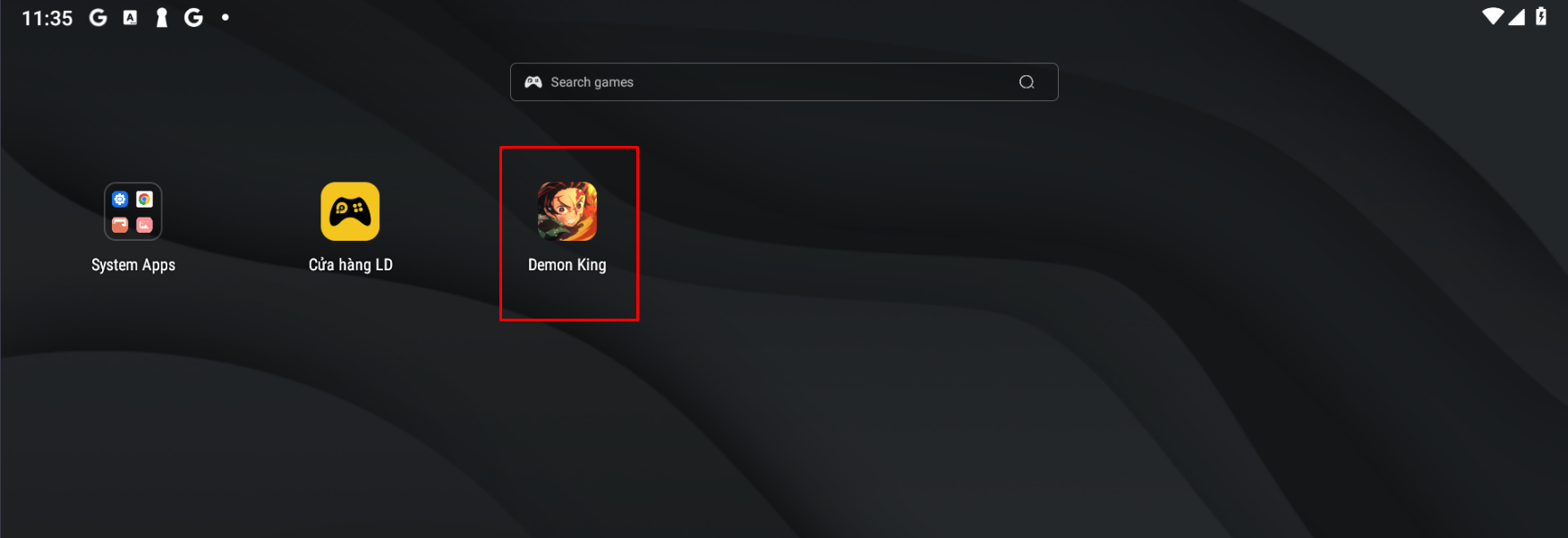
Wishing all Swordsmen relaxing and exciting moments with Demon King: Legend!
----------
DEMON KING: LEGEND – The Next - Gen Demon Slayers Brawl Game!




Chơi Game hơn 180 phút sẽ ảnh hưởng đến sức khỏe
CÔNG TY TNHH VMGE
Người chịu trách nhiệm nội dung: Trương Thoại Thiên Thanh
Địa chỉ: Tầng 14, Tòa nhà HM Town, 412 Nguyễn Thị Minh Khai, Phường 5, Quận 3, Thành phố Hồ Chí Minh, Việt Nam
Giấy xác nhận phát hành trò chơi điện tử trên mạng số 3046/GXN-SVHTT do Bộ Văn Hóa, Thể Thao và Du Lịch cấp ngày 17/09/2025


